
Updated on May 29, 2026
The touch-sensor technology is about using our fingers or some other pointer, to view and manipulate information on a screen. On a conventional system, with every mouse click, the operating system registers a mouse event. With a touch-screen system, every time your finger touches the screen, a touch event is registered.
A basic touch-screen system is made up of three components:
1. A touch sensor
2. Controller
3. Software driver
The touch-sensor is a clear panel, which when touched, registers a voltage change that is sent to the controller. The controller processes this signal and passes the touch event data to the PC through a bus interface. The software driver takes this data and translates the touch events into mouse events. A touch-screen sensor any of the following five mechanics: resistance, capacitance, acoustics, optics and mechanical force.
A resistant sensor uses a thin, flexible membrane separated from a glass or plastic substance by insulating spacers. Both layers are coated with ITO (Indium-tin-oxide). These metallic coatings meet when a finger or stylus presses against the screen, thus closing an electric circuit.
Here voltage is applied to the corners of the screen with electrodes spread uniformly across the field. When a finger touches the screen, it draws current from each current proportionately. The frequency changes are measured to determine the X and Y coordinates of the touch event.
These sensors detect a touch event when a finger touches the screen resulting in absorption of sound energy. Bursts of high frequency (5-MHz) acoustic energy are launched from the edges of the screen. Arrays of reflection at the edges divert the acoustic energy across the screen and redirect the energy to the sensors.
Because the speed of sound in glass is constant the energy arrival time identifies its path. A touch causes a dip in the received energy waveform for both axes. The timing of dips indicates the X and Y touch point coordinates.
A touch screen is a special type of visual display unit with a screen which is sensitive to pressure or touching. The screen can detect the position of the point of touch. The design of touch screens is best for inputting simple choices and the choices are programmable. The device is very user-friendly since it 'talks' with the user when the user is picking up choices on the screen.
Touch technology turns a CRT, flat panel display or flat surface into a dynamic data entry device that replaces both the keyboard and mouse. In addition to eliminating these separate data entry devices, touch offers an "intuitive" interface. In public kiosks, for example, users receive no more instruction than 'touch your selection.
Specific areas of the screen are defined as "buttons" that the operator selects simply by touching them. One significant advantage to touch screen applications is that each screen can be customized to reflect only the valid options for each phase of an operation, greatly reducing the frustration of hunting for the right key or function.
Pen-based systems, such as the Palm Pilot® and signature capture systems, also use touch technology but are not included in this article. The essential difference is that the pressure levels are set higher for pen-based systems than for touch. Touch screens come in a wide range of options, from full color VGA and SVGA monitors designed for highly graphic Windows® or Macintosh® applications to small monochrome displays designed for keypad replacement and enhancement.
Specific figures on the growth of touch screen technology are hard to come by, but a 1995 study last year by Venture Development Corporation predicted overall growth of 17%, with at least 10% in the industrial sector.Other vendors agree that touch screen technology is becoming more popular because of its ease-of-use, proven reliability, expanded functionality, and decreasing cost.
A basic touchscreen has three main components: a touch sensor, a controller, and a software driver. The touchscreen is an input device, so it needs to be combined with a display and a PC or other device to make a complete touch input system.
A touch screen sensor is a clear glass panel with a touch responsive surface. The touch sensor/panel is placed over a display screen so that the responsive area of the panel covers the viewable area of the video screen. There are several different touch sensor technologies on the market today, each using a different method to detect touch input. The sensor generally has an electrical current or signal going through it and touching the screen causes a voltage or signal change. This voltage change is used to determine the location of the touch to the screen.
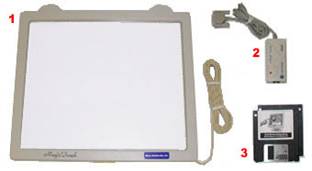
The controller is a small PC card that connects between the touch sensor and the PC. It takes information from the touch sensor and translates it into information that PC can understand. The controller is usually installed inside the monitor for integrated monitors or it is housed in a plastic case for external touch add-ons/overlays. The controller determines what type of interface/connection you will need on the PC. Integrated touch monitors will have an extra cable connection on the back for the touchscreen. Controllers are available that can connect to a Serial/COM port (PC) or to a USB port (PC or Macintosh). Specialized controllers are also available that work with DVD players and other devices.
The driver is a software update for the PC system that allows the touchscreen and computer to work together. It tells the computer's operating system how to interpret the touch event information that is sent from the controller. Most touch screen drivers today are a mouse-emulation type driver. This makes touching the screen the same as clicking your mouse at the same location on the screen. This allows the touchscreen to work with existing software and allows new applications to be developed without the need for touchscreen specific programming. Some equipment such as thin client terminals, DVD players, and specialized computer systems either do not use software drivers or they have their own built-in touch screen driver.
We offer two main types of touchscreen products, touchscreen add-ons and integrated touchscreen monitors. Touchscreen add-ons are touchscreen panels that hang over an existing computer monitor. Integrated touchscreen monitors are computer displays that have the touchscreen built-in. Both product types work in the same way, basically as an input device like a mouse or trackpad.
| Are you interested in this topic.Then mail to us immediately to get the full report.
email :- contactv2@gmail.com |
