To login into Kerala PSC Thulasi Portal, go to thulasi.psc.kerala.gov.in and enter your User ID and password. By Logging in, you can apply for an examination, download your hall ticket, view examination result, apply for certificates etc.
Steps to Login to Kerala PSC Thulasi Portal:
Go to the Official Thulasi Login Page:
Visit the official Thulasi login page on the Kerala PSC website: https://www.keralapsc.gov.in/thulasi
Enter Your Login Credentials:
You’ll need to enter your User ID (which you created during registration) and Password.
If you don’t have an account, click on “New User” or “Register” to create one. During registration, you’ll need to fill in basic details such as your name, email, mobile number, and other relevant information.
Click on “Login”:
After entering your User ID and Password, click the Login button.
Access Your Dashboard:
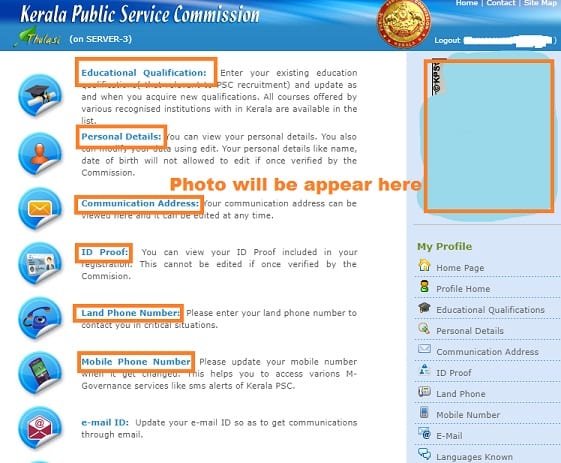
Once you are logged in, you will be able to access your Kerala PSC profile, apply for jobs, check results, and do other activities related to Kerala PSC exams.
You need to register only once and use the same User ID for every application for Departmental or Special Test or any other activities related with Departmental Examinations.
Every candidate appearing for a Departmental Test from January 2011 onwards, should register their details (Personal, Official & Communication details) before applying for examination. The Registration need to be performed only once and you should log in using this User ID and password for apply for an examination, download your hall ticket, view examination result, apply for certificates etc.
I do not remember my User ID.
Make a telephonic call to the Help Desk number provided in the main page and provide your details as asked by the person attending your call. These details will help us to track your User ID.
Also Read : Kerala Piravi Quiz Questions and Answers
How to Register for Kerala PSC Thulasi Portal:
Go to the Registration Page:
Visit the registration page: Kerala PSC Registration and click on “New User? Register here”.
Fill in Your Details:
Enter your personal information, including your name, date of birth, contact details, and other required details.
Create a Username and Password:
Choose a User ID and Password that you’ll use to log in in the future. Make sure you choose something secure and easy to remember.
Complete the Registration:
After filling in the required details and agreeing to the terms, click on Submit to complete your registration.
Activate Your Account:
You may receive an activation email or SMS. Activate your account by following the instructions in the message.
I have my User ID but do not remember my password.
You can reset your password and reuse the same User ID. Click the forgot password and provide your UserID, Date of Birth, Unique ID type (Driving Licence, Pan Card, PEN Card etc) that you provide during registration and the ID No of this Unique ID.
SMS Options available
To Know User ID : KL USR DEPT
To Reset Password : KL USR DEPTRST UserID DOB
e.g if your UserID is aniltvm and Date of Birth is 16/04/1984, the SMS format will be
KL USR DEPTRST aniltvm 16041984
After successful reset the new Password will be aniltv16041984 (First 6 letters of your UserID followed by DOB in DDMMYYYY format)
Do not forget to change your password on your first login after reset.
Also Read : https //csab.nic.in Register and Login
How to Login if you forgot your Username or Password
1. To know User ID SMS KL USR
2. To reset your password SMS
KL USR RST USERID DATE_OF_BIRTH From your registered mobile only.
Eg. to reset the password of user aniltvm with the date of birth 21/1/1983 the format will be KL USR RST aniltvm 21011983.
After a successful reset, the new Password will be anupv65011983. Don’t forget to change your password on your first login after reset.
View Your KPSC OMR Examination Mark
Select the post name and enter your registration number to get your marks displayed. Once KPSC uploaded the OMR examination marks, it will remain there as uploaded only for two months. If you are qualified to avail any grace marks, it will be granted separately at the time of the ranking process.
If you are interested to be settled with a government job, we request not to just concentrate on KPSC only, there are a lot more which includes all the Central Government recruitment exams and more like IBPS, SBI, RBI which all comes in public sector banks category and also follow an everlasting pattern similar to government jobs.
How to Recover Kerala PSC Tulasi User ID if you have lost or forgotten
The is an option to get recover the KPSC OTR user ID with sending a SMS from the following format to get USER ID of registered candidate.
Who are lost their user ID those male and female candidates can sent the SMS through their registered mobile number only to Type KL USR send SMS to 166 or 51969 or 9223166166
In case any candidate will have not recover with using above all methods they will have a chance to recover their user ID and Password with Dialing Kerala PSC help desk to 0471 2554000 and give your registration details like submitted name, mobile number and etc,.. the KPSC Tulasi Help desk representative will track your User ID.

Be the first to comment