
https //sv.ut.edu.vn Register and Login for Courses
Instructions for logging in and registering for courses on the student personal page sv.ut.edu.vn.
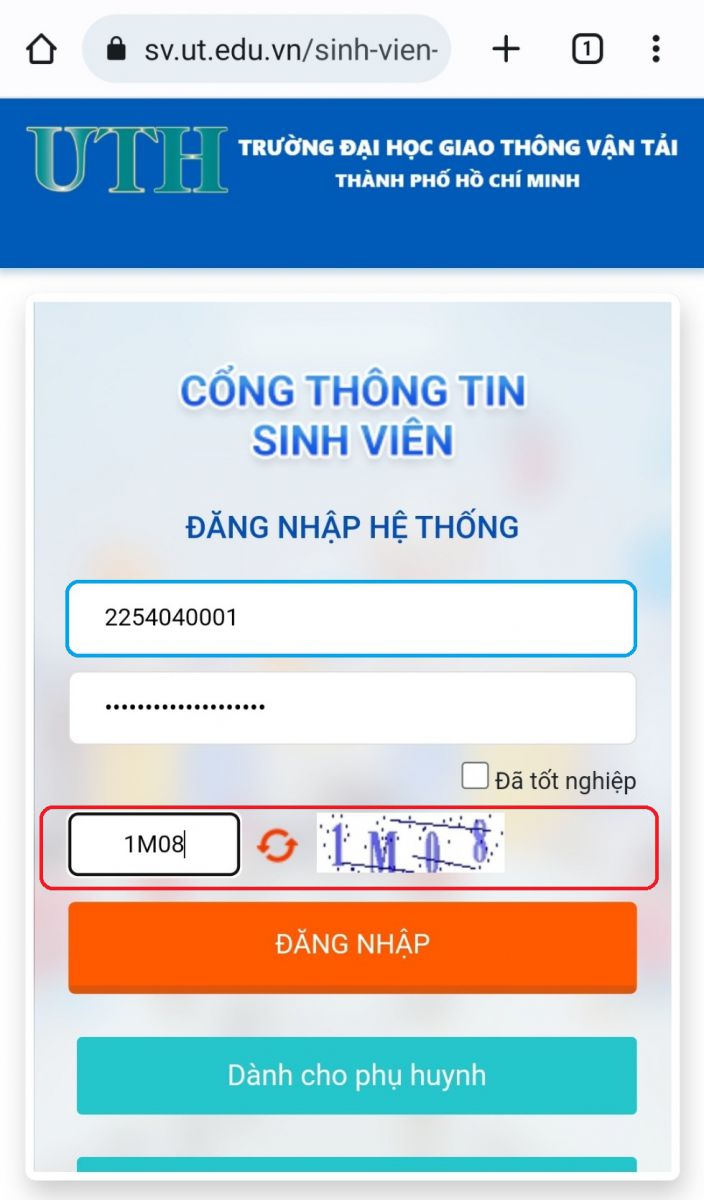
Step 1: Students access the page https://sv.ut.edu.vn/ enter student code, password and security code then select login:
Step 2: After successfully logging in, on your personal page, select “Register for courses”
Step 3: Select the semester you need to register for (select the semester you need to register for the course):
Step 4: On the Course Registration page, select the type of registration: New course, re-course, improvement course and select the subject to register for.
Step 5: In the class details section, select the class you need to register for and note the following:
- Status: Pending registration
- Class schedule (day, shift, period…)
- Classroom (study location)
After selecting the correct class to register for, select Register .
The system reports ” You have successfully registered” to complete the registration.
Step 6: Check the registration results in the Registered Courses section for the semester
– You can view the class schedule or cancel your registration if the class is in “Pending Registration” status.
