
⚡ Quick Answer: PMMVY Online Registration & Login (2026)
The official portal for Pradhan Mantri Matru Vandana Yojana has migrated from the legacy address (pmmvy.nic.in) to the upgraded digital platform at https://pmmvy.wcd.gov.in.
- For Citizens (Self-Registration): No password is required! Click “Citizen Login”, enter your registered mobile number, and log in securely via instant OTP.
- For Department Staff (ASHA/AWW): Departmental users must log in via the “Beneficiary Registration” stakeholder tab using their assigned departmental User ID and Password.
- Financial Benefit: First living child = ₹5,000 (in 2 installments). Second child (if a girl) = ₹6,000 (single installment).
Navigating maternal healthcare incentives just got significantly easier. Under the Ministry of Women and Child Development’s upgraded PMMVY 2.0 guidelines, pregnant women and lactating mothers across India can now self-register online without relying solely on physical paperwork at local health centers.
This comprehensive, expert-verified guide explains the exact registration process, how to access your login credentials, and the updated financial breakdown for 2026.
1. Understanding PMMVY: Financial Benefits & Installment Structure
The Pradhan Mantri Matru Vandana Yojana provides partial wage compensation to ensure pregnant women can take adequate rest and afford vital nutritional support. Under the latest direct benefit transfer (DBT) guidelines, funds are routed directly to Aadhaar-seeded bank accounts.
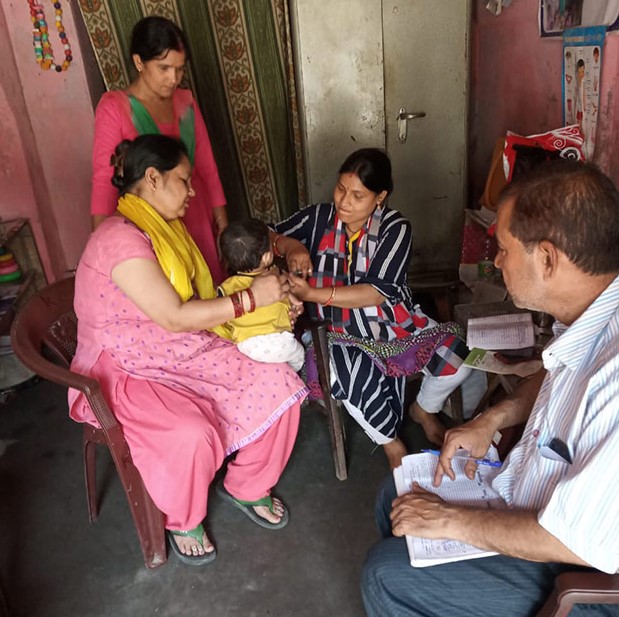
Local Anganwadi Workers (AWWs) and ASHA workers continue to facilitate rural registrations alongside the self-service portal.
| Child Category | Installment Milestone | Disbursement Amount |
|---|---|---|
| 1st Living Child | Pregnancy registration + at least one Ante-Natal Check-up (ANC) within 6 months of LMP | ₹3,000 |
| 1st Living Child | Child birth registration + completion of 1st cycle of immunization (14 weeks) | ₹2,000 |
| 2nd Girl Child (PMMVY 2.0) | Birth registration of girl child + complete 14-week immunization cycle | ₹6,000 (Single Payout) |
2. Step-by-Step Online Registration Guide (Self-Service)
If you are registering yourself for the first time, follow these strict procedural steps to avoid application rejection due to Aadhaar mismatches:
- Access the Official Gateway: Open your secure web browser and navigate strictly to https://pmmvy.wcd.gov.in (avoid third-party apk downloads or legacy `.nic.in` mirrors).
- Initiate Citizen Signup: Click on the “Citizen Login” button located in the top navigation header.
- Verify Identity: Enter your active 10-digit mobile number and click “Verify”. Input the One-Time Password (OTP) received via SMS.
- Create User Profile: Fill in your Full Name, State, District, Block, and Village details. Select your relationship to the beneficiary (Self, Husband, or Guardian) and hit “Create Account”.
- Submit Data Entry Form: Once inside your personal dashboard, navigate to
Data Entry > Beneficiary Registration. Select whether you are applying for your First Child or Second Girl Child. - Upload Mandatory Documents: Attach clean digital scans of your Aadhaar Card, Mother and Child Protection (MCP) Card, and an approved proof of disadvantage (e.g., E-Shram Card, BPL Ration Card, or PMJAY Ayushman Card).
- Submit & Save Reference ID: Click submit. Write down the generated numeric tracking ID to monitor your payment status.
Is Tomorrow a Bank Holiday for Muharram? June 26, 2026 Updates
3. Solving PMMVY Login ID and Password Issues
The most common point of confusion surrounding the PMMVY portal involves login credentials. Let’s clarify how authentication works based on your user role:
For Beneficiaries (Citizens)
You do not have a permanent password. The Ministry implemented a passwordless, highly secure system to prevent credential theft. Your Login ID is simply your registered mobile number, and your password is a dynamic OTP generated fresh upon every session. If you do not receive the OTP within 2 minutes, check your mobile network signal and click “Resend OTP”.
For Stakeholders (ASHA / ANM / Supervisors)
Field functionaries operate on a dedicated administrative interface. Your Login ID and Password are generated and issued strictly by your local Block or District Nodal Officer.
- First-Time Login: When logging in with newly issued credentials, the portal will immediately trigger a mandatory prompt to create a strong, personalized password.
- Forgot Password: If a field worker forgets their administrative password, they must click the “Forgot Password” link on the stakeholder login tab, input their registered official email ID, and follow the automated reset link.
📌 TL;DR Summary: Key Takeaways
- Correct URL: Use pmmvy.wcd.gov.in (the legacy pmmvy.nic.in automatically routes here).
- Login Rules: Citizens log in simply with a Mobile Number + OTP. Official workers use a permanent User ID + Password.
- Total Incentives: Receive ₹5,000 for your first child or ₹6,000 for a second child (if female).
- Core Requirements: You must have an Aadhaar account linked to your bank account (NPCI mapped for Direct Benefit Transfer) and your official hospital MCP check-up card.

Comments are closed