Visit the Hathway website and click on the “Self Care” or “Login” section. Enter your account number or registered mobile number. Use the OTP sent to your mobile/email to log in.
To access Hathway Connect:
- Visit the Hathway website (https://www.hathway.com/)
- Look for the “Selfcare Login” or “My Account” option, usually found in the top right corner of the page.
- Enter your registered mobile number or Hathway account number and password to log in.
Hathway Connect
Hathway Connect is the online self-service portal provided by Hathway broadband services. It allows you to:
Manage your account: View and update your personal details, change your password, etc.
Check your usage: See how much data you’ve used in the current billing cycle.
Pay your bills online: Make payments through various methods like credit/debit card, net banking, etc.
Raise service requests: Report issues with your connection or other services.
View and download invoices: Access your past bills and statements.
Upgrade or change your plan: Explore available plans and make changes to your subscription.
Track your service requests: Check the status of your complaints or queries.
WHY ACCOUNT IS NOT ACTIVE AFTER MAKING PAYMENT
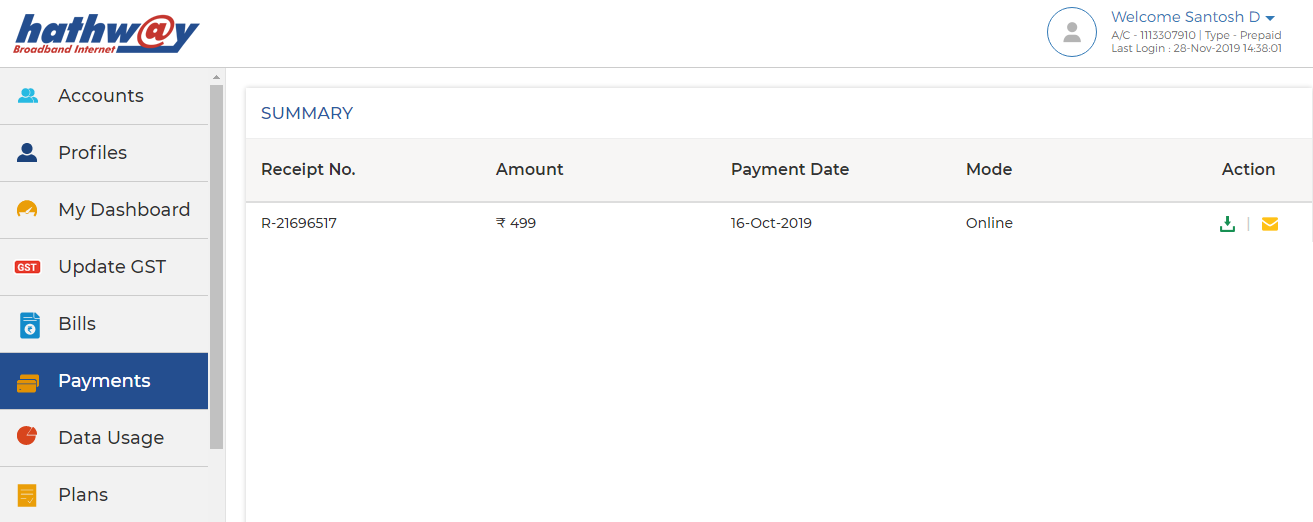
Log-in to Hathway Self Care Portal on www.hathway.com
Click on “Payments” tab on the Left Menu Bar .
Check whether your Payment is reflecting .
Online Payments usually get updated within 30 mins to 4 hrs. depending on the Bank / Payment Gateway . Payment thru Cash or Cheque takes 12 hrs. to 24 hrs. to get updated
If your Payment is not reflecting then wait for the same to be updated.
If your Payment is updated then go to “My Dashboard” on the Left Menu Bar .
Check the Renewal Amount under “ Current Plan”.
If the amount you have paid is same as your Renewal Amount , your account will get auto activated within 30 mins.
If the amount paid by you is different you may need to pay the differential amount to get your account activated
Also Read : CVS Caremark Specialty Pharmacy Phone Number
HOW TO CHECK MY RENEWAL DATE AND AMOUNT
- Log-in to Hathway Self Care Portal on www.hathway.com
- Go to “My Dashboard” in the Left Menu Bar .
- Click on “View More” under “ Current Plan”
- You will get the Renewal Amount and Your Plan Expiry Date under “SERVICE PLAN DETAILS”
