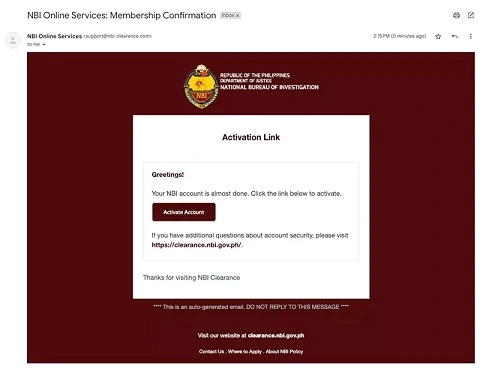
To activate your NBI (National Bureau of Investigation) account, which is necessary to apply for an NBI clearance, follow the steps outlined below. This process is for those who need to create an online NBI account to apply for the clearance, schedule an appointment, and track the status of their application.
Steps to Activate Your NBI Account:
1. Visit the NBI Online Registration Portal:
Go to the official NBI Clearance website:
https://clearance.nbi.gov.ph/
2. Create an Account:
If you don’t have an NBI account yet, follow these steps:
Click on “Register” on the top right of the homepage.
You will be asked to provide your personal details such as:
Full Name (First Name, Middle Name, Last Name)
Date of Birth
Gender
Email Address
Phone Number
Password (make sure it’s strong and memorable)
Agree to the Terms of Service and click “Register”.
3. Activate Your Account:
After you register:
Check Your Email: NBI will send you a confirmation email with a link to activate your account.
Click the Activation Link: Open the email, click on the activation link, and you’ll be redirected to the NBI website to confirm your registration.
4. Log In to Your Account:
Once activated, go back to the NBI Clearance website and log in with the email address and password you used during registration.
5. Complete Your Profile (If Needed):
After logging in, you may be prompted to fill out additional details or update your profile information.
Complete the profile information to ensure your details are correct.
6. Set an Appointment:
Once your account is activated, you can proceed with scheduling an appointment for your NBI clearance:
Choose your preferred NBI branch and select the date and time for your appointment.
Pay the clearance fee. You can pay through online payment methods (credit/debit card, over-the-counter payments, etc.) or the available payment options depending on your location.
7. Confirmation:
After successful payment, you will receive an appointment confirmation with a reference number.
Print or save the confirmation as you will need it when you go to your appointment.
8. Go to Your NBI Appointment:
On the scheduled date, go to the NBI branch with the following:
Printed confirmation or digital copy of your appointment.
Valid government-issued ID (e.g., driver’s license, passport).
Payment receipt (if you paid offline).
Clear facial photo (taken during the appointment).
You will be processed for your NBI clearance after this.
Also Read : Activate TYT on YouTube
If You Already Have an NBI Account:
If you already have an NBI account and need to activate or reactivate it:
Simply log in to your account on the NBI website using your credentials.
If you forgot your password, use the “Forgot Password” option on the login page to reset it.
Troubleshooting Account Activation Issues:
Didn’t receive activation email:
- Check your spam/junk folder.
- Ensure your email address was typed correctly during registration.
- Try registering with a different email address if the problem persists (especially if you’re using a Hotmail/Outlook account, as some users have reported issues with these).
“Email already taken”:
- This means your registration was partially successful, but the activation link wasn’t clicked or received. You might need to contact NBI online support if you can’t log in or resend the activation.
Website Glitches:
- The NBI website can sometimes experience heavy traffic or technical issues. Try again later or use a different browser/device.
By following these steps, you will successfully create and “activate” your NBI online account, enabling you to proceed with your NBI Clearance application.

Be the first to comment