How To Activate Apple Intelligence
“To Activate Apple Intelligence, Go to Settings > Apple Intelligence & Siri. Tap Join the Apple Intelligence Waitlist. Apple will notify you when Apple Intelligence is ready to be activated on your device.”
To activate Siri, Apple’s voice assistant, follow these steps depending on the device you’re using:
📱 iPhone or iPad
Using “Hey Siri” (Voice Activation)
Go to Settings > Siri & Search.
Toggle on Listen for “Hey Siri”.
You’ll be prompted to set up Siri by saying “Hey Siri” a few times so it can recognize your voice.
Once set up, you can say “Hey Siri” anytime to activate Siri without touching your phone.
Using the Button
For iPhones with a Home Button: Press and hold the Home button to activate Siri.
For iPhones with Face ID (no Home button): Press and hold the Side button (the button on the right side of the phone) to activate Siri.
💻 Mac
Using the Keyboard
On newer Macs, press and hold Command (⌘) + Space to activate Siri.
Using “Hey Siri”
Go to System Preferences > Siri, and check the box for Enable Ask Siri.
Then, you can say “Hey Siri” if your Mac supports it (this is available on newer models).
🖥 Apple Watch
Using “Hey Siri”
Ensure Hey Siri is enabled in the Watch app on your iPhone: Watch app > Siri > toggle on Listen for “Hey Siri”.
Raise your wrist and say “Hey Siri” to activate Siri.
Using the Digital Crown
Press and hold the Digital Crown on your Apple Watch to activate Siri.
🎧 AirPods
With AirPods Pro or AirPods (2nd generation and later):
Just say “Hey Siri” to activate Siri if you’ve enabled it in your phone settings.
Alternatively, you can press and hold the stem of the AirPods Pro to activate Siri.
⚙️ Enable Siri on Your Device (if not already enabled)
Go to Settings > Siri & Search.
Make sure Listen for “Hey Siri”, Press Side/Home Button for Siri, and Allow Siri When Locked are turned on.
Once activated, you can ask Siri to do a variety of things like sending messages, playing music, setting reminders, and even answering questions!
Important Notes:
• Beta Availability: Initially, Apple Intelligence will be available in beta, so access might be limited.
• Region Limitations: Even after the official release, Apple Intelligence might not be available in all regions immediately.
• Privacy: Apple emphasizes that Apple Intelligence prioritizes user privacy and processes data on-device whenever possible.
Alternative for Users Outside Supported Regions
If you’re located outside a supported region, you might be able to activate Apple Intelligence by changing your device and Siri language settings to U.S. English. However, this is not officially supported and may not work in all cases.
Remember: Apple Intelligence is still under development, and the activation process might change slightly when it’s officially released. Stay updated with Apple’s official announcements and support documents for the latest information.
What is Apple Intelligence
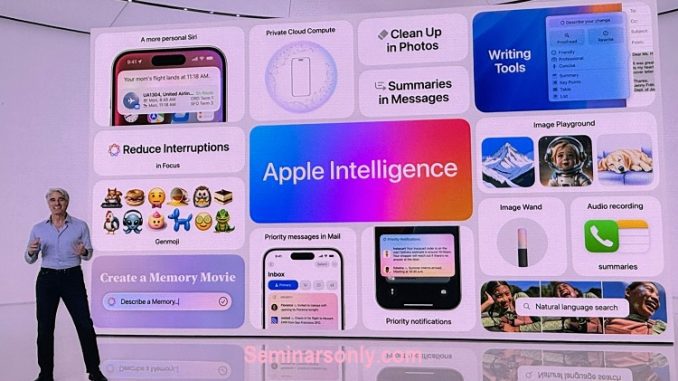
Apple Intelligence is a new suite of AI features designed to bring powerful generative models and AI capabilities directly to your iPhone, iPad, and Mac. It’s deeply integrated into the core of Apple’s operating systems (iOS, iPadOS, and macOS) and is designed to make everyday tasks easier, more efficient, and more creative while maintaining a high standard of user privacy.

Key features and capabilities of Apple Intelligence include:
1. Enhanced Writing Tools: AI-powered writing assistance with features like Rewrite and Proofread, helping you improve your writing style, generate summaries, and create lists or tables from text.
2. Visual Expression: AI tools to create unique and personalized images or wallpapers using text descriptions or existing photos.
3. Smart Photo and Video Editing: Automatically remove unwanted elements from images, generate captions, and create movie-like presentations from your photo library.
4. Summarized Notifications: AI-driven summaries of notifications across apps, helping you stay focused and prioritize important messages.
5. Priority Messages in Mail: Automatically identifies and surfaces time-sensitive emails.
6. Smart Replies in Mail: Suggests quick responses and helps ensure all questions in an email are answered.
7. Improved Siri Functionality: More natural language understanding and the ability to perform complex tasks using voice commands.
Key Points about Apple Intelligence
1. Privacy Focused: Designed with user privacy at its core, processing data on-device whenever possible and using secure techniques for cloud-based processing.
2. Integrated Experience: Seamlessly embedded into Apple’s operating systems, enhancing existing apps and features.
3. On-Device Processing: Many models run entirely on your device, ensuring fast performance and privacy.
4. Private Cloud Compute: When needed, more complex tasks leverage Apple’s secure cloud infrastructure, but personal data remains protected.
Availability:
Apple Intelligence is expected to be released in phases, starting in October 2024 with iOS 18.1, iPadOS 18.1, and macOS Sequoia 15.1. Additional features and capabilities will be added over time. It will be available on compatible devices, including iPhone 15 Pro, iPhone 15 Pro Max, any iPhone 16 model, or an iPad or Mac with an M1 chip or later.
