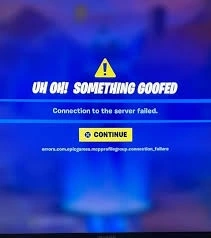
If you’re encountering the errors.com.epicgames.mcpprofilegroup.connection_failure issue while trying to play Fall Guys or another Epic Games title, then this error typically indicates a problem with connecting to Epic’s online services, often due to network, firewall, or account-related issues.
Here are some steps you can take to resolve the problem:
✅ 1. Restart Your Network Hardware
Begin by restarting your modem and router:
Unplug them from power.
Wait for 30 seconds.
Plug them back in and wait for the lights to stabilize.
This can help refresh your connection and resolve temporary network issues.
🔧 2. Clear Epic Games Launcher Cache
Corrupted cache files can cause connectivity problems:
Press
Win + R, type%localappdata%, and press Enter.Navigate to
EpicGamesLauncher > Saved > WebCache.Delete the
WebCachefolder.Restart your computer and relaunch the Epic Games Launcher.
Also Read : Suenos Activate Wristband 2025
🔒 3. Disable Antivirus and Firewall Temporarily
Security software can sometimes block the Epic Games Launcher:
Temporarily disable your antivirus and firewall.
Try launching the game again.
If successful, add exceptions for the Epic Games Launcher in your security software before re-enabling them.
🌐 4. Disable VPN and Proxy Servers
VPNs and proxies can interfere with connections:
Go to Settings > Network & Internet.
Click on Proxy.
Ensure “Use a proxy server” is turned off.
🔄 5. Flush DNS and Reset Network Settings
Refreshing your network settings can resolve underlying issues:
Open Command Prompt as Administrator.
Run the following commands one by one:
Restart your computer.
🛠️ 6. Run Epic Games Launcher as Administrator
Running the launcher with elevated permissions can resolve access issues:
Right-click on the Epic Games Launcher shortcut.
Select “Run as administrator”.
🔄 7. Reinstall Epic Games Launcher
If the above steps don’t work:
Uninstall the Epic Games Launcher.
Download the latest version from the Epic Games website.
Install it and check if the issue persists.
🧾 8. Check Epic Games Server Status
Sometimes, the issue may be on Epic’s end:
Visit the Epic Games Status Page to check for any ongoing outages or maintenance.
