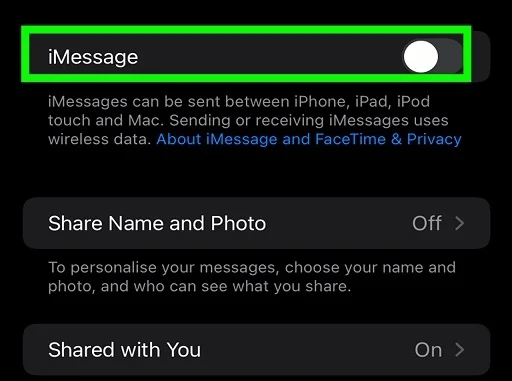
The “activation error” is usually caused by a mismatch between your carrier (Verizon, T-Mobile, AT&T) and Apple’s servers, or a block on “short codes” (verification texts).
Here is the step-by-step fix for US carriers:
1. The “Carrier Settings” Update (Most Common Fix)
US carriers frequently push small updates to help phones connect to their network. If you missed one, iMessage won’t activate.
Go to Settings > General > About.
Wait on this screen for about 15-30 seconds.
If a pop-up appears saying “Carrier Settings Update”, tap Update.
Restart your phone and try activating iMessage again.
2. Check for “Short Code” Blocking
Apple activates iMessage by sending a silent verification text. If you have “spam protection” features enabled on your carrier account, they might be blocking this text.
T-Mobile: Check if “Scam Shield” is blocking short codes.
Verizon/AT&T: If you recently asked to block “premium texts” or spam, call them and ask if “Short Code Messaging” is blocked on your line. It needs to be ON.
Also Read : YouTube Error 153, a “Video Player Configuration Error,” Fix
3. The “Airplane Mode” Refresh
This forces your phone to re-authenticate with the nearest cell tower.
Go to Settings > Messages and turn iMessage OFF.
Turn Airplane Mode ON for 15 seconds.
Turn Airplane Mode OFF and wait for your LTE/5G bars to return.
Turn iMessage ON.
4. Check Date & Time (Critical)
Apple’s servers will reject the activation request instantly if your time is even slightly off.
Go to Settings > General > Date & Time.
Ensure “Set Automatically” is ON and the Time Zone is correct (e.g., New York, Los Angeles, etc.).
5. Using an eSIM? (iPhone 14/15/16 US Models)
Since newer US iPhones are eSIM only, sometimes the “line” gets stuck.
Go to Settings > Cellular.
Under “SIMs,” tap your primary number.
Toggle “Turn On This Line” to OFF, wait 10 seconds, and toggle it back ON.
Note:
If it says “Waiting for activation” for more than 24 hours, you must contact Apple Support. They will likely need to clear a “token” on their end.

Be the first to comment