


Published on Apr 02, 2024
The Universal Serial Bus (USB), with one billion units in the installed base, is the most successful interface in PC history. Projections are for 3.5 billion interfaces shipped by 2006. Benefiting from exceptionally strong industry support from all market segments, USB continues to evolve as new technologies and products come to market. It is already the de facto interconnect for PCs, and has proliferated into consumer electronics (CE) and mobile devices as well. The Wireless USB is the first the high speed Personal Wireless Interconnect.
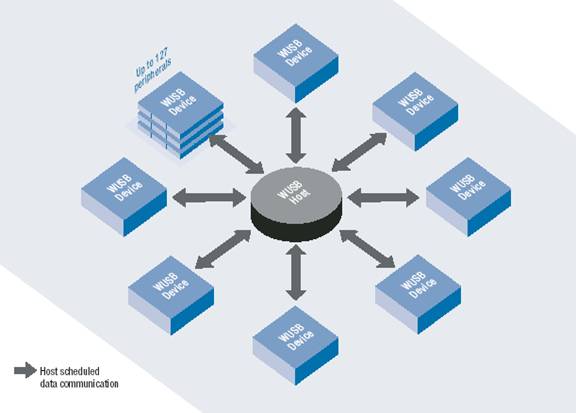
Wireless USB will build on the success of wired USB, bringing USB technology into the wireless future. Usage will be targeted at PCs and PC peripherals, consumer electronics and mobile devices. To maintain the same usage and architecture as wired USB, the Wireless USB specification is being defined as a high-speed host-to-device connection. This will enable an easy migration path for today's wired USB solutions.
Wireless USB paper takes a brief look at the widely used interconnect standard, USB and in particular, at the emerging technology of Wireless USB and its requirements and promises.
Just about any computer that you buy today comes with one or more Universal Serial Bus connectors on the back. These USB connectors let you attach everything from mice to printers to your computer quickly and easily. The operating system supports USB as well, so the installation of the device drivers is quick and easy, too. Compared to other ways of connecting devices to your computer (including parallel ports, serial ports and special cards that you install inside the computer's case), USB devices are incredibly simple!Anyone who has been around computers for more than two or three years knows the problem that the Universal Serial Bus is trying to solve -- in the past, connecting devices to computers has been a real headache!
" Printers connected to parallel printer ports, and most computers only came with one. Things like Zip drives, which need a high-speed connection into the computer, would use the parallel port as well, often with limited success and not much speed.
" Modems used the serial port, but so did some printers and a variety of odd things like Palm Pilots and digital cameras. Most computers have at most two serial ports, and they are very slow in most cases.
" Devices that needed faster connections came with their own cards, which had to fit in a card slot inside the computer's case. Unfortunately, the number of card slots is limited and you needed a Ph.D. to install the software for some of the cards.
The goal of USB is to end all of these headaches. The Universal Serial Bus gives you a single, standardized, easy-to-use way to connect up to 127 devices to a computer.
Just about every peripheral made now comes in a USB version. In fact almost all the devices manufactured today are designed to be interfaced to the computer via the USB ports.
Connecting a USB device to a computer is simple -- you find the USB connector on the back of your machine and plug the USB connector into it. If it is a new device, the operating system auto-detects it and asks for the driver disk. If the device has already been installed, the computer activates it and starts talking to it. USB devices can be connected and disconnected at any time.
The Universal Serial Bus has the following features:
" The computer acts as the host.
" Up to 127 devices can connect to the host, either directly or by way of USB hubs.
" Individual USB cables can run as long as 5 meters; with hubs, devices can be up to 30 meters (six cables' worth) away from the host.
" With USB 2.,the bus has a maximum data rate of 480 megabits per second.
" A USB cable has two wires for power (+5 volts and ground) and a twisted pair of wires to carry the data.
" On the power wires, the computer can supply up to 500 milliamps of power at 5 volts.
" Low-power devices (such as mice) can draw their power directly from the bus. High-power devices (such as printers) have their own power supplies and draw minimal power from the bus. Hubs can have their own power supplies to provide power to devices connected to the hub.
" USB devices are hot-swappable, meaning you can plug them into the bus and unplug them any time.
" Many USB devices can be put to sleep by the host computer when the computer enters a power-saving modenbsp;
The MultiBand OFDM Alliance (MBOA) and the WiMedia Alliance will base wireless USB on the Ultra-Wideband (UWB) radio efforts. Both are open industry associations that promote personal-area range wireless connectivity and interoperability among multimedia devices in a networked environment. With the formation of the MBOA in June 2003, OFDM for each sub-band was added to the initial multiband approach to develop the best technical solution for UWB. To date, the MBOA has more than 60 participants that support a single technical proposal for UWB. In the multiband OFDM approach, the available spectrum of 7.5 GHz is divided into several 528 MHz bands. This allows the selective implementation of bands at certain frequency ranges while leaving other parts of the spectrum unused. The dynamic ability of the radio to operate in certain areas of the spectrum is important because it enables adaptation to regulatory constraints imposed by governments around the world.
Wireless USB performance at launch will provide adequate bandwidth to meet the requirements of a typical user experience with wired connections. The 480 Mbps initial target bandwidth is comparable to the current wired Hi-Speed USB standard. With 480 Mbps as the initial target, the Wireless USB specification will allow for generation steps of data throughput. As the Ultra-Wideband (UWB) radio Wireless USB is based on evolves and future process technologies take shape, bandwidth could exceed 1 Gbps. The specification intends for Wireless USB to operate as a wire replacement with targeted usage models for cluster connectivity to the host and device-to-device connectivity at less than 10 meters.
Wireless USB security will be designed to deliver the same level of security as wired USB. Connection-level security between devices, for instance, will be designed to ensure a device is associated and authenticated before operation of the device is permitted. Higher levels of security involving encryption will be implemented at the application level. An important goal will be to ensure that processing overhead supporting security does not impose noticeable performance impacts or device cost. In regards to device association, one of the primary objectives when implementing Wireless USB will be to make sure it enables easy installation and operation.
In a way, wireless technology presents new challenges to ease of use. That’s because wired connections provide the user with very direct expectations. In essence, when they plug a device in, (i.e., when the wire is connected), the user can see the connection is made (or not made if the plug doesn’t fit). Wireless connections on the other hand, due to environmental characteristics, may establish connection paths that are not obvious. In fact, it may not be obvious when a device is connected. To facilitate device associations, the Wireless USB specification will include the following requirements:
• An easy way for consumers to connect Wireless USB devices and hosts (the focus of device connection or “pairing” will be simplicity and ease-of-use).
• Mutual authentication in device and host connections so that devices will have the opportunity to validate the host and the host will have the opportunity to validate the device.
• World class security as a standard and non-removable feature for all certified Wireless USB devices.
• Asymmetric host-centric model that maintains the USB model of cheap/simple devices and confines the complexity to the host.
The growing use of wireless technology in PC, CE, and mobile communications products, along with the convergence of product functionalities, calls for a common wireless interconnect standard. The standard needs to work well with products and usage models from all three industries. To better understand what’s driving the need for a common standard, we’ll examine how these products will soon be used in home and business environments. We’ll also consider the rise of
“dual-role” devices that include both host and device capabilities.
The trend towards smaller form factors, portability and mobility in consumer electronics devices has led to the emergence of new classes of products. These products have rich functionality, multimedia capabilities, and require connection to other AV devices for display, editing, listening, sharing, and downloading of content. Within the home, for instance, a family may have a digital video camcorder, digital still camera, portable MP3 player, PDA, tablet PC, wireless speakers, and personal video display device.
Each of these portable devices has a need to connect to other devices such as PCs or stationary consumer electronics products, such as stereos, HDTVs, video recorders, enter- tainment PCs, or the like. All these devices would benefit from the ability to connect without cables. Think, for instance, about the number of devices in your home and the tangle of wires between them. Wireless USB would eliminate these wires and enable devices to wirelessly connect to each other. Naturally, the CE environment will have high expectations for performance. Many consumer usage models will center on demanding streaming media distribution using compression algorithms. Typical video delivery with standard SDTV/DVD can consume between 3 to 7 Mbps, while HDTV can require between 19 to 24 Mbps. A point distribution technology like Wireless USB with its projected effective bandwidth of 480 Mbps, could manage multiple HDTV streams while still having the capacity to support other high-bandwidth data streams. Host buffering could enable a network backbone to effectively distribute content to all distribution hosts, enhancing the quality experience for all users. The Wireless USB specification will be an effective way to ensure that the delivered convenience and quality of service meets typical consumer entertainment expectations.
Connectivity issues and other inconveniences of wired connections can hurt productivity and slow the adoption of new devices within the work environment. Users of mobile computers and PDAs particularly face connection challenges as they move from place to place and want to use printers and other devices. Wireless USB could simplify their lives while providing a time-saving, high-speed connection that enhances productivity. In this section, we give some typical scenarios of how Wireless USB could enhance connectivity in the office.
Executives, managers and heavy users need faster, dedicated services in their office rather than those shared on the network. With Wireless USB, devices such as inkjet and laser printers, scanners, external storage devices, and PC cameras can quickly connect and exchange data at high speed. Top Wireless USB uses will probably include: simultaneous and frequent-use mass storage for data back-up, printer connectivity, scanner connectivity, and PDA or cell phone synchronization.
For office workers that are very mobile and frequent different areas of an enterprise, the option of easily printing from a mobile platform (notebook PC, PDA, cell phone, etc.) is very attractive. With Wireless USB, a worker could simply approach the nearest printer or multi-function device and print the needed documents. This would alleviate many of the inconveniences today in finding a printer on a network and connecting to it.
In industries such as medical, manufacturing and retail where mobile devices are becoming pervasive, having wireless data synchronization ability would allow users to quickly sync with a central computer to update the information in corporate database. Wireless USB, for example, could enable medical professionals making rounds to take notes and collect data on patients via handheld or PC tablet, and then quickly sync with the network to access additional patient data/history and treatment plans.
Wireless USB will enable colleagues to more easily share devices and use each other’s devices within an office environment. Easy sharing of scanners, printers, storage devices, and other possible peripherals would be possible. Exchanging large files off hard disk drives without sending them through e-mail or over the network would be possible.
The Wireless USB looks all set to replace its wired version once it is launched in a commercial manner. However one of the major disadvantages of Wireless USB over conventional USB is that the power supply for a device will have to be provided by itself. In the case of conventional USB, the power to the device ( upto 500mW) was supplied to the device through the wires used to connect a USB device to its host.
Apart from this minor disadvantage, all other factors look to favour Wireless USB over conventional USB. It has got performance, ease of installation and use, good security levels, and anything else you can ask for. In the wireless future, Wireless USB will definitely have a role to play, by replacing USB as the inter-connect standard.
| Are you interested in this topic.Then mail to us immediately to get the full report.
email :- contactv2@gmail.com |
